This week, I reflect on an odd but eventful WWDC 2026
WWDC 2026 - What happened, what's next?
WWDC is done. The keynote aired on Monday, the developer betas dropped the same day, and I've spent the last few days with iOS 27 and macOS Golden Gate on my devices. Before we get into the details, let's quickly revisit last week's newsletter, where I made five predictions about what to expect. Not because I want to pat myself on the back, but because looking at what we got right and wrong is a useful way to frame what actually happened.
For what it's worth, the predictions were based on months of reporting from Mark Gurman, MacRumors, and a string of other analysts. There's nothing impressive about reading the tea leaves when the tea leaves are being handed to you. But it is reassuring that the rumour mill has become so reliable that you can essentially sketch out an Apple keynote weeks in advance. Whether that's a good thing for Apple is another question entirely.
Here's how the five predictions played out.
I said at least half the keynote would be about the new Siri. That was pretty much spot on. Apple rebranded its assistant as "Siri AI" and gave it the lion's share of the 76-minute keynote, which was notably shorter than usual. Craig Federighi walked through the new standalone Siri app, the conversational interface, the on-screen awareness, the personal context features, and the new Apple Foundation Models that power it all. The message was clear: this is the feature Apple has been promising for two years, and it's finally here. Or at least, it's finally being shown in a form that looks like it actually works.
I predicted no new hardware, and that was correct. No Mac Studio, no Mac mini, no Apple TV, no HomePod hub, no surprises. It was a software-only show from start to finish, which is the right call given the supply constraints Apple is still navigating. Interestingly, John Ternus, the man who takes over as CEO in September, didn't appear during the keynote at all. This was very much Tim Cook's farewell, and Cook clearly wanted to own it. It was visibly an emotional moment for him as he reflected on his time leading the company. "I truly believe the best is still ahead at Apple," he said. A fitting way to close out his final keynote.
I said that outside of AI, the software updates would be underwhelming, and that this would be a Snow Leopard year. That's proven accurate. Watching the keynote, what struck me most was that Apple led with fixes before features. The whole thing was framed around making existing things work better rather than piling on new ones. There were tweaks to the Liquid Glass design, readability improvements, a wide array of small quality-of-life upgrades, and AI woven into every corner of the operating system. macOS 27, now named Golden Gate, brings some welcome refinements and Safari tab management features. watchOS 27 didn't even get its own dedicated segment, which tells you a lot about how little is changing there. As someone who downloaded the developer betas on Monday evening, I can confirm that these are the most stable developer betas I have ever used. That tells you everything about Apple's priorities this year. They've focused on making things work, and it shows. I think a lot of frustrated Apple users are going to be happy with the direction this year.
One thing that didn't get much stage time but quietly caught my attention is the fact that Siri AI is coming to Apple Watch. Not all Apple Watches, mind you. watchOS 27 itself is only compatible with six models: the Series 9, Series 10, Series 11, Ultra 2, Ultra 3, and SE 3. Everything older, including the original Ultra, has been dropped entirely. And even within that list, Siri AI specifically requires a Series 10 or later, Ultra 2 or later, or SE 3, so the Series 9 gets the software update but misses out on the headline feature. It's a small pool of devices. But for those of us who own one of those watches, this could be genuinely transformative. There's a dedicated Siri app on the watch, your conversations sync across your iPhone, iPad, Mac, and watch, and you can start a question on one device and pick it up on another. The idea of being able to raise your wrist and ask Siri to pull something from your calendar, reference a message thread, or draft a quick reply, all with the kind of contextual awareness we've been talking about, is exactly the kind of thing that makes a smartwatch feel smart rather than just a notification mirror on your wrist. Apple barely mentioned this during the keynote, which is a shame, because it might end up being one of the most practically useful things to come out of Monday.
I predicted that visionOS 27 would barely get a mention. It got more stage time than I expected, but I still came away feeling like Apple was paying lip service rather than showing genuine commitment. visionOS 27 brings Spatial Panoramas, which let you turn your own panoramic photos into immersive 3D environments, a redesigned Control Center, new curvature windows, and a 3D Siri bauble you can just look at and start talking to. It's fine. It's incremental. But there was nothing in that segment that would make anyone rush out and buy a Vision Pro, and nothing that suggests Apple has a compelling long-term consumer vision for the platform beyond keeping the lights on. For Vision Pro owners hoping for a reason to feel excited about their purchase, Monday didn't deliver one.
And finally, I said to look for foldable iPhone clues hidden in the software. Apple did indeed show new features where apps can adapt their layout to different aspect ratios, including what looks like a full landscape mode with side-by-side app support. It wasn't called out as a foldable feature, because Apple hasn't acknowledged the foldable exists yet. But if you know what you're looking for, the breadcrumbs are obvious. iOS 27 is clearly being built to accommodate a device with a much wider screen than any current iPhone, and September is going to be very interesting.
You watch the videos... but how much do you actually remember?
If you’re anything like most people who watch my YouTube videos, or read The Daily Swipe, you’ve probably watched loads of iPhone tips videos over the years, bookmarked a few, saved some to Watch Later… and then completely forgotten where that useful tip was when you actually needed it.
That’s exactly why I created iPhone Essentials Plus.
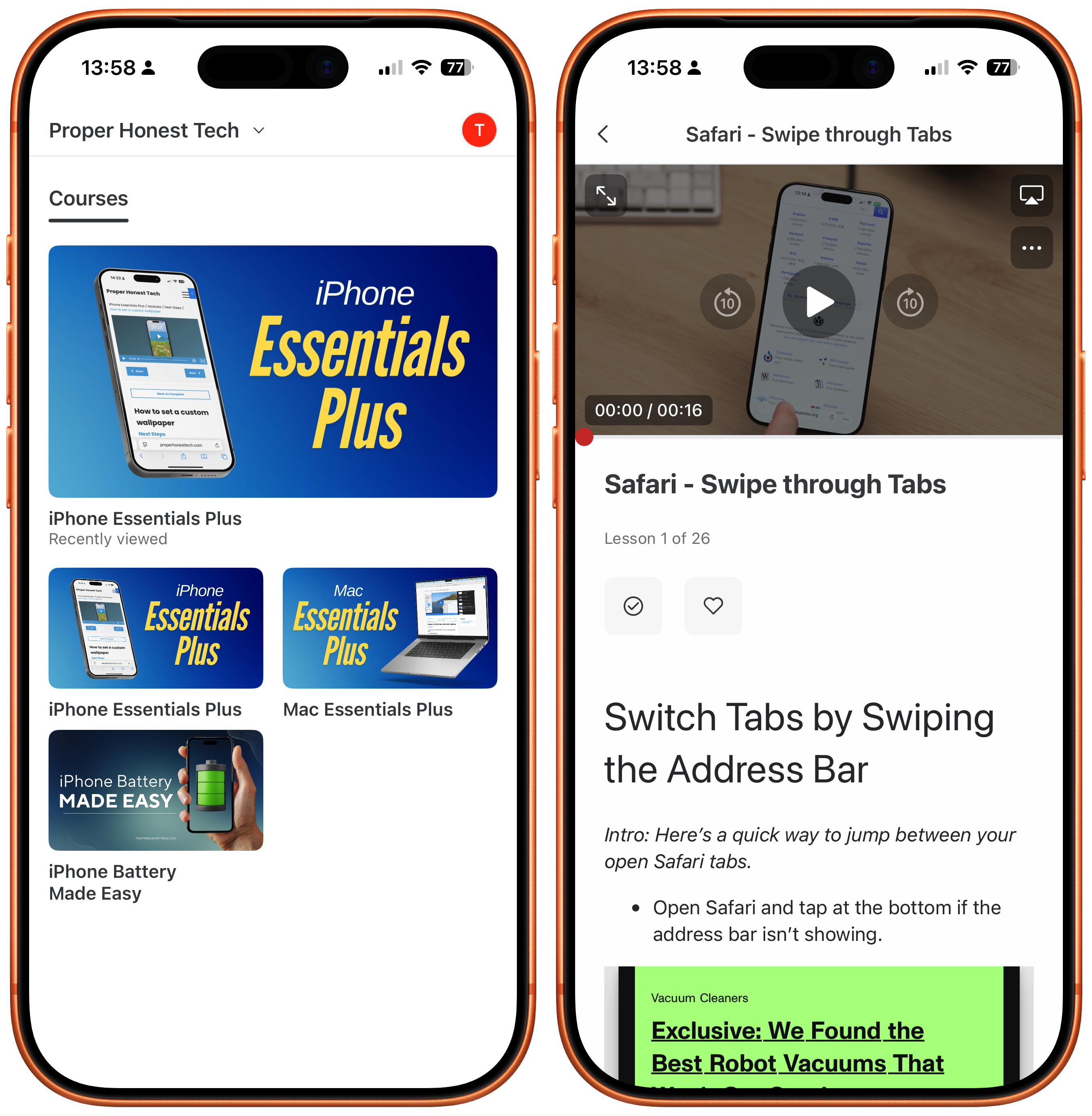
It’s a searchable, step-by-step iPhone guide designed to help you feel more confident using the phone you already own, without having to remember which random YouTube video something appeared in.
Every lesson includes a short video, a simple guide with screenshots, and a downloadable PDF, so whether you prefer watching, reading, or quickly looking something up, you’re covered.
It’s a one-time purchase with lifetime access, no subscription, and all future updates included.
If you’ve ever thought:
“I know Tom showed me how to do this somewhere…”
this was built for exactly that.
Purchase Links;
- iPhone Battery Made Easy
- iPhone Essentials Plus
- Mac Essentials Plus
- iPhone & Mac Essentials Plus Discount Bundle
Now, on to the main event: Siri AI.
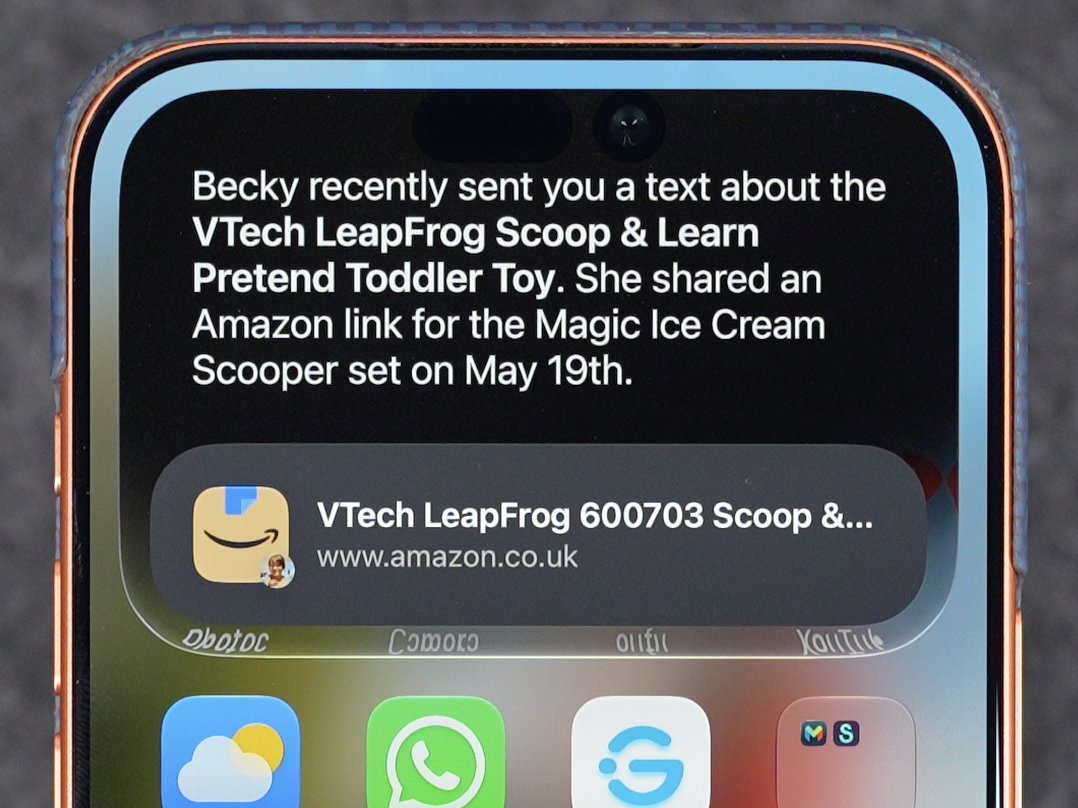
I've been using it for a few days now, and here's my honest take. It's very good. It's not as polished as ChatGPT or Claude or Gemini, and you wouldn't expect it to be at this stage, but the underlying capability is genuinely impressive. The thing that stands out most is the context awareness. Siri AI understands what's on your screen, it remembers what you've asked it earlier in the conversation, it can reference your emails, your messages, your calendar, and your photos in a way that actually feels joined up rather than like a parlour trick. The other day, I asked Siri what the kid's toy was that my wife had messaged me about a month back. It immediately identified the exact toy from a message thread that was weeks old. I then asked it to find it for me on Amazon, and it did. That's two steps, across two different apps, pulling from a conversation I'd long forgotten about, handled in seconds. And this is exactly where Apple's late arrival to the AI party might actually work in its favour. While everyone else has been racing to build chatbots that write poetry and generate images, Apple has quietly built something that solves the kind of small, real, everyday problems that most people actually have. If that's the direction Siri AI continues to go in, the major players might have more to worry about than they think.
The standalone Siri app works well too. It's got a clean, dark interface, conversation history, the ability to attach files and images, and it genuinely feels like Apple's answer to ChatGPT rather than a gimmick. Is it going to replace Claude or ChatGPT for me? No. I think Siri AI serves a different purpose. It's not a tool for deep research or complex creative work. It's a system-level assistant that makes your phone smarter in small, practical ways. And in that respect, it's very good at what it does.
One thing I predicted last week was that Apple would avoid naming Gemini, Claude, or ChatGPT on stage, and instead reframe the whole thing as "your favourite AI tools." That's essentially what happened. Apple talked about "Apple Foundation Models" and the "AFM Cloud Pro" model, which runs on Nvidia GPUs in Google's cloud. If you didn't know the backstory, you'd think Apple built the whole thing itself. The word "Gemini" was conspicuously absent from the keynote. The word "Google" was never mentioned once. It's classic Apple: take someone else's engine, put it in your own chassis, and put your badge on the bonnet.
As ever, my strong recommendation is that most people should not be downloading the developer betas. They're stable by beta standards, but they're still betas, and things will break. If you can wait, the public beta should arrive next month, and the full release will land in September alongside the new iPhones. If you can hold out, September is the safest bet. But if you're a developer or someone who's comfortable with the risks, what's there right now is genuinely promising and hints at some exciting things to come this year.
The other thing worth noting is the keynote format itself. For the first time in as long as I've been watching WWDC, Apple didn't break the presentation down into separate operating system segments. There was no "now let's talk about iPadOS" moment, no dedicated watchOS section, no individual platform deep-dives. Instead, Apple presented features thematically, jumping across iOS, macOS, watchOS, and the rest as needed. I think this is probably how it's going to be going forward, and it makes sense. The operating systems are becoming increasingly intertwined, with shared frameworks, shared design language, and shared AI features that run across everything. Breaking them into separate buckets feels increasingly artificial when the same technology powers all of them.
It was an interesting WWDC. Perhaps a slightly underwhelming one, if we're being honest. But I think that's actually fine, because what Apple delivered on Monday was something arguably more important than spectacle: it delivered on a promise. The new Siri is here, and it works. The software is stable. The bugs and rough edges that plagued iOS 26 and Liquid Glass last year have been smoothed out. After two years of broken commitments and delayed features, Apple stood on stage and showed something that actually does what they said it would do. And crucially, they went out of their way to prove it. The demos were live, running on real devices in real time, not the polished, pre-recorded marketing clips that burned them in 2024. Apple wanted the audience to know that this time, it's real. That matters more than any flashy demo.
But here's the thing. With the software story now told, what's ahead for the rest of 2026 on the hardware side is genuinely exciting. We're potentially looking at one of the busiest product launches in Apple's history across the next six months.
September alone could be enormous. The iPhone 18 Pro and Pro Max will lead the way, but the real headline is the iPhone Ultra, Apple's first ever foldable, which is shaping up to be the most significant new iPhone form factor since the original. Whether you're sceptical about it or not, and regular readers of this newsletter will know I have my questions, there's no denying it's going to dominate the conversation. Then there's the smart home push. The new Apple TV, the new HomePod mini, the full-sized HomePod, and the long-awaited smart home hub with its touchscreen display have all reportedly been finished and waiting for the new Siri to be ready. Now that Siri AI is out in the open and heading towards a September release, those products finally have the software foundation they need to launch. There's also the rumoured Apple security camera and doorbell, which may not be the most exciting products Apple has ever made, but would be an incredibly profitable entry into a market that's crying out for a premium, privacy-first option. Apple all but tipped its hand on Monday by showing how Home can now support 4K video feeds and uses AI to tell you what's actually happening rather than bombarding you with a hundred motion notifications every time a cat walks past your driveway. That wasn't a coincidence.
Beyond that, we're expecting a dedicated Mac event in October. The Mac Studio with M5 Ultra, the Mac mini with M5, potentially a refreshed iMac, and maybe even the first details of the OLED MacBook Pro redesign could all land before the end of the year, supply chain permitting. And then there's the smart glasses and the camera-equipped AirPods, both of which are reportedly in advanced testing and could show up as early as late 2026 or early 2027.
Monday's keynote was the quiet part. The part where Apple tidied the house, fixed the plumbing, and made good on what it owed us. The loud part, the part where they fill that house with genuinely new and exciting products, starts in September. And I cannot wait.
Tip of the Week
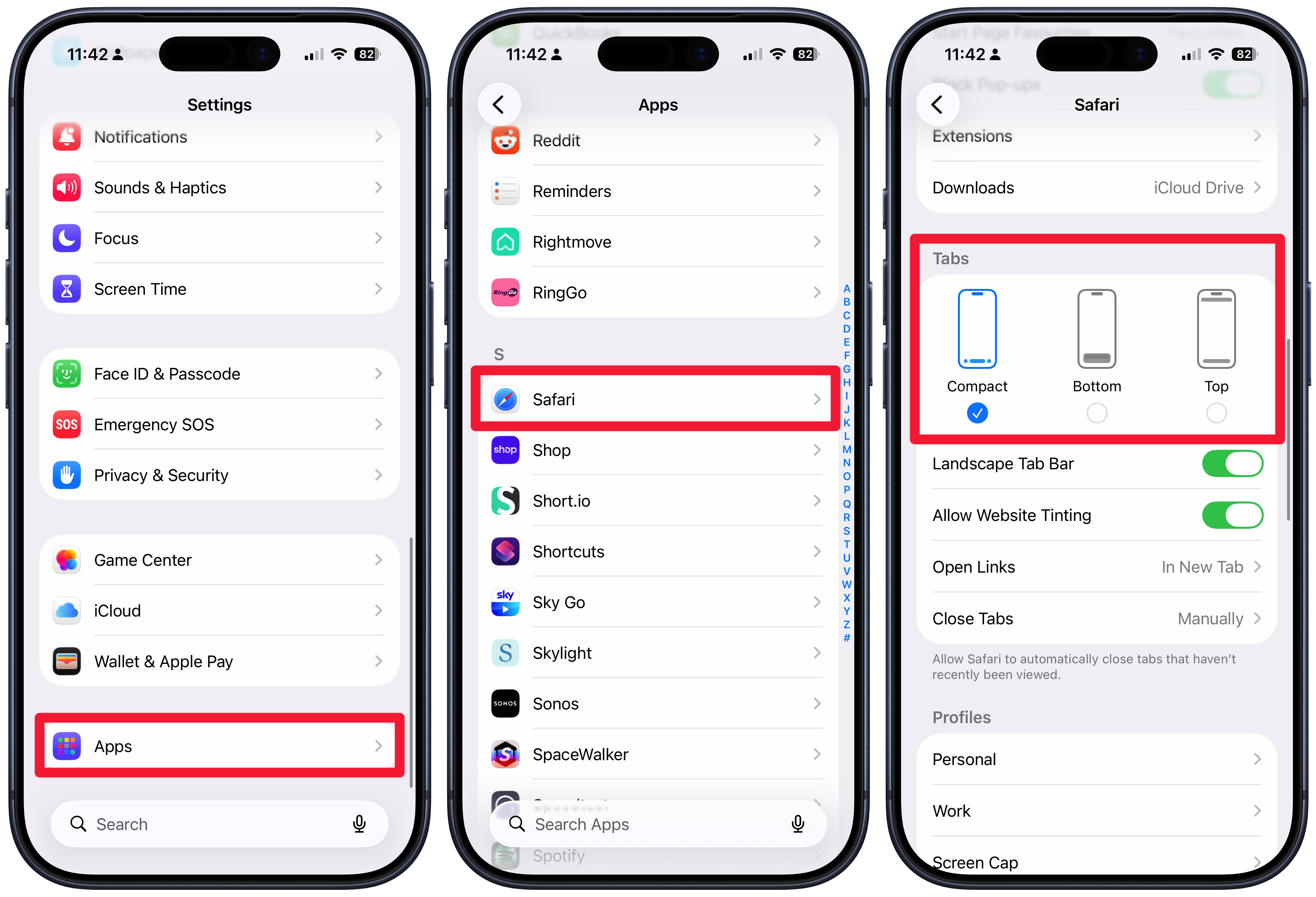
Did you know, if you don't like the way the Tab Bar looks in Safari on your iPhone, you can change it? Just head to Settings, then Apps, then Safari, and scroll down to the Tabs section, where you can choose from 3 options;
- Compact (the standard view)
- Bottom
- Top