This week, Apple's bold new Siri plans, the iPhone 18 Pro and 17e are coming, and why you should update your iOS today.
Apple's "Campos" Project: Siri Reborn as a Full AI Chatbot
Well, the news we've been waiting for has finally landed. Earlier this week, Mark Gurman at Bloomberg gave us the clearest picture yet of what Apple is planning for Siri, and it's a significant shift in direction. The assistant is being transformed into a full chatbot, codenamed Campos internally, which will completely replace the current Siri interface across iPhone, iPad and Mac.
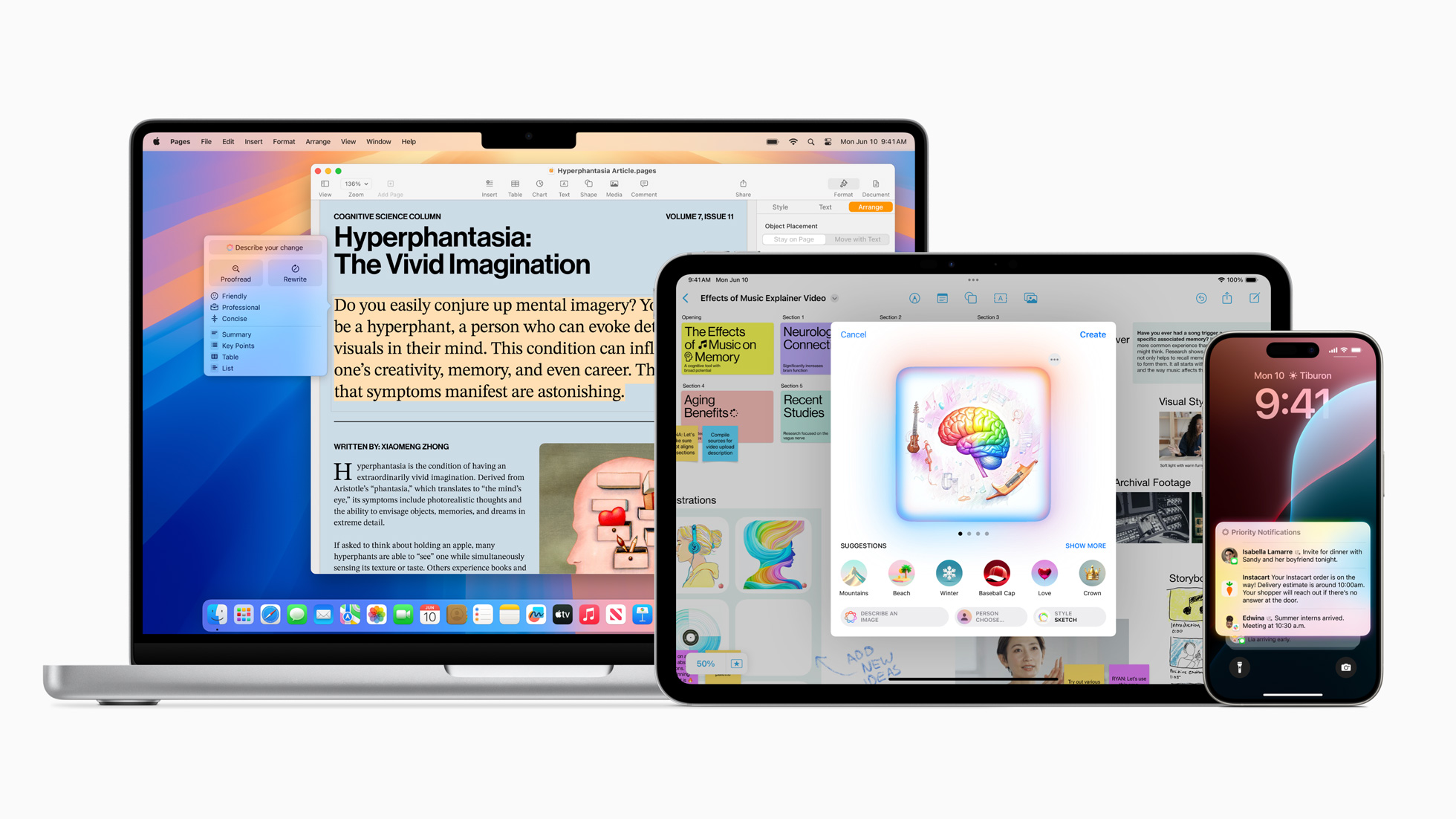
This is particularly interesting because Craig Federighi previously said he didn't want Siri to become a chatbot. He wanted AI woven into everything you do, not some separate chat experience bolted on the side. The entire sales pitch for Apple Intelligence was 'AI for the rest of us' after all. But it seems the pressure from ChatGPT, Gemini and the rest has changed the thinking at Apple. Sometimes you have to go where the users already are, and right now that's conversational AI.
If the rumours are accurate, the new Siri will support both voice and text, handling proper back-and-forth conversations rather than the quick commands (and disappointing responses) we've grown used to. Apple is promising it'll search the web, create content, generate images, analyse documents, and tap into your personal data to find files, messages and calendar events. It'll also understand what's on your screen and work seamlessly across core apps. Imagine asking Siri to edit a photo based on a description or draft an email about something in your calendar. That kind of contextual help is what we've been promised for years but never actually received.
As I discussed earlier this month, all of this is being powered by Google's Gemini models through a billion-dollar-a-year partnership. Apple runs custom versions on their own Private Cloud Compute servers, so your data stays with Apple and gets discarded after use. Google doesn't see it, which is important. It's a pragmatic approach that lets Apple catch up quickly while continuing to develop their own AI in the background.
The timeline involves two separate updates to keep track of. First, iOS 26.4 is expected to arrive in March or April with the improvements originally promised at WWDC 2024. Better personal context, on-screen awareness, improved responses. Not the full chatbot, but a noticeable step forward. Then iOS 27 lands in September with the complete Campos experience, which Apple is reportedly planning to make the centrepiece of their WWDC presentation in June. They can't afford to get this wrong. A repeat of WWDC 2024 is simply not an option.
What strikes me most is how much is riding on this. The deep integration Siri has across Apple's ecosystem is something no third-party chatbot can match. If Apple gets this right, the argument for keeping ChatGPT or Gemini on your iPhone becomes much weaker. Your assistant already knows your calendar, your photos, your emails and your files. That's a genuine advantage, but only if the execution finally lives up to the promise.
For now, we wait. After everything we've seen over the past couple of years, I'm (ver cautiously) optimistic. For the first time in a while, it feels like Apple is taking this seriously. Whether Siri can truly compete with the best remains to be seen, but at least the ambition finally matches the moment.
Your iPhone can do more than you think
January's the month for fresh starts – and if you've been meaning to actually learn what your Apple devices can do, there's no better time.

Maybe you got a new iPhone or Mac over Christmas. Maybe you've had yours for years and still copy-paste the same way you did in 2019. Either way, I built something that can help.
iPhone Essentials Plus is a comprehensive training portal with more than 200 lessons that cover everything your iPhone can do. No fluff, no filler – just practical skills you'll actually use, with fresh content added regularly.
Every lesson gives you three ways to learn: a short video walkthrough, a step-by-step guide with screenshots, and a downloadable PDF for quick reference. Learn on your commute, at your desk, or whenever you've got five minutes.
There are no ads, no sponsors, and no subscription traps. One payment, lifetime access.
Got a Mac too? I've also created Mac Essentials Plus with the same approach. Grab it separately or bundle both courses for the best value.
Make this the year you stop Googling the same questions twice.
Purchase Links;
- iPhone Essentials Plus
- Mac Essentials Plus
- iPhone & Mac Essentials Plus Discount Bundle
- iPhone & Lifetime PDF
- Mac & Lifetime PDF
- iPhone, Mac & Lifetime PDF
iPhone 18 Pro Rumours: Sorting the Sense from the Speculation
The rumour mill for the iPhone 18 Pro is in full swing, and as usual, not everyone agrees on what Apple has planned for September. The past week has seen conflicting claims about one of the most visible parts of the phone: what happens to the Dynamic Island.
Jon Prosser of Front Page Tech kicked things off with a video suggesting Apple would move the front camera to a pinhole cutout in the top-left corner of the display, with Face ID hardware hidden beneath the screen. The Dynamic Island would relocate to that corner too, expanding outward from the edge rather than from its current central position. It's a bold claim, and Prosser's renders certainly look striking.

But here's the thing: it never quite sat right with me. A camera hole tucked into the corner feels like something you'd see on a mid-range Android phone, not an iPhone. Apple turned the notch into a design statement and did the same with the Dynamic Island. Sticking a lone pinhole off to one side? That's not confident design, that's compromise.
(It's worth noting that Prosser is currently facing a massive lawsuit from Apple over alleged trade secret theft relating to iOS 26, which adds another layer of uncertainty to his reporting.)
A More Credible Picture
Fortunately, newer information has emerged that makes a lot more sense. Weibo leaker Instant Digital shared details suggesting the top-left camera story was based on a mistranslation of earlier supply chain reports. What's actually moving to the top-left corner isn't the camera at all. It's the IR flood illuminator, a small component of Face ID that's simple enough to hide under the display.
The front camera, dot projector, and infrared camera would stay exactly where they are now, housed in a smaller, centred Dynamic Island. Same concept, just more refined.
This version has since been backed by former display analyst Ross Young, leaker ShrimpApplePro, and aligns with earlier Bloomberg reporting. That's a solid consensus, and frankly, it's the outcome I was hoping for. Make the Dynamic Island smaller and smaller, until it's eventually gone entirely.
What Else Is on the Table?
Beyond the display, the rumour mill points to a variable aperture camera system for improved low-light performance and more natural bokeh, new colours including burgundy and brown, an A20 Pro chip on a 2nm process, and Apple's own C2 modem replacing Qualcomm. The Camera Control button may also lose its capacitive touch layer in favour of pressure-only input. Odd perhaps for Apple to remove a function from a flagship phone, but I know of absolutely nobody that actually makes use of this feature.
Some of this aligns with multiple sources. Some remains speculative. But on the question of where that front camera ends up, I'm confident Apple will do what it usually does: refine rather than reinvent, and keep things looking unmistakably iPhone.
New iPhone? Here's how to keep it running like new.
There's nothing worse than unboxing a brand new iPhone, only to watch the battery drain to 20% by mid-afternoon. You start wondering what you're doing wrong, which apps are the culprits, or if you've somehow got a dud.
Here's the truth: most battery drain issues aren't about faulty hardware. They're about settings you didn't know existed, background processes you never approved, and Apple's defaults that prioritise features over longevity.
That's why I created iPhone Battery Made Easy – a no-nonsense guide that cuts through the confusion and gives you exactly what you need to maximise your battery life, starting today.

Inside, you'll discover how your iPhone battery actually works (it's not what you think), which settings are silently killing your charge, and how to identify apps secretly draining power in the background. Everything is explained in plain English with screenshots and real examples you can implement in minutes.
Whether you're setting up a new iPhone or rescuing your current one from constantly hunting for a charger, this guide will transform how long your battery lasts each day and how many years it stays healthy.
Stop accepting dead batteries by dinner time. Take control of your iPhone's battery life today.
Can Apple Finally Make a Budget iPhone Worth Buying?
When Apple launched the iPhone 16e last February, it was positioned as the successor to the iPhone SE and a fresh start for Apple's budget iPhone line. What we actually got was a bit of a Frankenstein device, stitched together from older iPhone parts and missing features that had been standard across the rest of Apple's range for years.

It wasn't a bad phone. The A18 chip was genuinely impressive at the price point, and the OLED display was a welcome step up from the SE's ageing LCD panel. But at £599, the 16e felt oddly incomplete. No MagSafe, despite Apple using the technology since 2020. A single rear camera in 2025. The old notch design instead of the Dynamic Island. It left many wondering who this phone was actually for. For most buyers, an older Pro model or even a refurbished iPhone with a fresh battery made more sense.
So what about the 17e? If recent reports are accurate, Apple may have finally listened.
The biggest change, according to multiple credible sources, is the arrival of the Dynamic Island. The notch appears to be gone. It's a visual upgrade that matters more than specs alone might suggest. It brings the 17e in line with every other current iPhone, and frankly, it was overdue.
Perhaps more significantly, MagSafe is also expected to return. This was arguably the strangest omission from the 16e. Apple's entire accessory ecosystem now revolves around MagSafe, from charging stands to car mounts to wallets. Leaving it off the budget model felt like a strange act of self-sabotage. If the 17e does include MagSafe support, it becomes a far more practical device for anyone already invested in that ecosystem.
On the inside, the phone is tipped to run a slightly downclocked version of the A19 chip. This is the same approach Apple took with the 16e, where the A18 had one fewer GPU core than the standard iPhone 16. In practical terms, most users won't notice the difference. What matters is that it should support Apple Intelligence (for what that's worth) and remain snappy and capable for years to come.
It turns out that not everything is changing, though. The display is still expected to be a 6.1-inch OLED panel running at 60Hz. No ProMotion, no always-on display. Given that the standard iPhone 17 now has a 120Hz screen, and even mid-range Android phones have offered high refresh rates for years, this remains a notable compromise. Apple clearly sees 120Hz as a feature worth paying extra for, despite most phone owners claiming that they can't see a difference.
Pricing is expected to stay at around £599, which is where things get interesting. At that price, the iPhone 16 now sits at £699 after its post-iPhone 17 price drop. The gap is narrowing. For an extra £100, you get a second camera lens, a brighter display, and the Camera Control button. Apple will need the 17e to make a strong case for itself.
If the rumours hold true, the iPhone 17e looks like a much more coherent product than its predecessor. The Dynamic Island and MagSafe alone address the two most glaring weaknesses of the 16e. It's still not going to compete with the standard 17 or the new Air model on features, but it no longer feels like Apple deliberately held features back to protect its other phones.
For anyone who wants a modern iPhone without spending Pro money, the 17e could finally be the answer. We'll likely find out in February.
Why You Should Check Your iPhone is Up to Date Right Now
There's a security story doing the rounds this week, and it's one worth paying attention to.
Apple recently patched two serious vulnerabilities in WebKit, the engine that powers Safari and every other browser on your iPhone and iPad. It turns out that these flaws were being actively exploited before Apple fixed them, which is why they're classified as "zero-day" vulnerabilities.
Here's what you need to know in plain English: if someone could trick your device into loading a malicious webpage, they could potentially run harmful code on your iPhone or iPad. You wouldn't need to download anything or tap a suspicious link in the traditional sense. Simply visiting the wrong webpage could be enough.
Now, before anyone starts panicking, some context is important here. Apple has described these attacks as "extremely sophisticated" and aimed at "specific targeted individuals." In practice, this typically means journalists, activists, or high-profile figures being targeted by state-sponsored spyware. The average person is very unlikely to be singled out.
But that doesn't mean you should ignore it.
The vulnerabilities have been patched in iOS 26.2, and Apple has also released iOS 18.7.3 for those still on the previous major version. The concern is that iOS 26 adoption has been slower than usual this year, with reports suggesting a smaller percentage of users have updated compared to previous releases. That means millions of iPhones could still be running vulnerable software.
If you're already on iOS 26, head to Settings, then General, then Software Update and make sure you're on version 26.2. If you've been holding off on updating to iOS 26 entirely, perhaps because you're not sold on the Liquid Glass redesign, you can still protect yourself by installing iOS 18.7.3. Apple is continuing to release security patches for older versions, specifically so you don't have to upgrade to stay safe.
The key message here isn't panic. It's awareness. These kinds of vulnerabilities are discovered regularly, and Apple is generally quick to patch them. But the patches only work if you actually install them.
Good device hygiene matters. Check your software version, tap that update button, and you can get on with your day knowing you've done the sensible thing.
Tip of the week
Did you know, you can sort the Apps on your iPhone by the date you last used them, allowing you to quickly find the apps that you've not touched in a while, making it easier to delete them? Go to Settings, then General, then iPhone Storage, and change the button that says 'Size' to 'Last Used Date'.

My new content
Tips and Settings that have almost DOUBLED my iPhone battery life
|
Content I've enjoyed
The New Tech Making Apple Look Bad
|

Is this the iPhone 18 Pro?
|
The $1 Billion Coca-Cola Machine
|