This week, we might know a little more about the secretive OpenAI/Jony Ive product, China shows off a mosquito sized drone, and Apple has quietly fixed some of the biggest complaints of Liquid Glass
More about that secretive OpenAI Product
We got some more interesting news this past week about the OpenAI–Jony Ive partnership, though it came from a slightly unexpected place — a copyright lawsuit. If you’re not familiar with the backstory, Jony Ive founded an independent design company called LoveFrom after leaving Apple. It’s long been rumoured that LoveFrom has been working with OpenAI behind the scenes over the past couple of years.
More recently, Ive teamed up with former Apple colleagues Scott Cannon, Evans Hankey, and Tang Tan to form a new venture called I/O. The ambition for I/O is to develop, engineer, and manufacture a new generation of AI-native products — ones that move beyond traditional computing interfaces like keyboards and screens. The formation of I/O was essentially designed to enable closer collaboration with OpenAI on their highly secretive hardware project.
This has now landed them in legal hot water. A small audio company called Iyo (spelled I-Y-O) has accused Ive’s team of trademark infringement, claiming not only that I/O is using a confusingly similar name, but that the team had previously met with Iyo and even viewed a prototype of their unreleased product — which they’re referring to as the world’s first “audio computer”, an in-ear headphone.

That’s led many to speculate that the OpenAI hardware product might be some kind of earbud or smart earpod. But I/O is currently pushing back on that, stating that whatever their first product is, it won’t be a wearable. That said, court proceedings did reveal some interesting tidbits. An email from March between an I/O employee and Tang Tan suggests that the company had been looking at 3D scans of human ears as a starting point for ergonomic design. And another email from Sam Altman shows him turning down an investment opportunity from Iyo, stating that he was “working on something competitive”.
If it’s true that the product isn’t a wearable, that’s a little surprising. I/O previously described their project as a companion device to your phone or computer — something small and pocketable, possibly around the size of a wallet, designed to sit on your desk while you work. But that raises some usability questions. With so many devices already in our daily lives, would people really adopt a standalone desk assistant?
Earphones, by contrast, would arguably make more sense. They’re intuitive, always with you, and already serve as a natural interface for both listening and speaking. Add in microphones and cameras, and you’ve got something with real-world scanning potential — all in a familiar form factor that wouldn’t require a steep learning curve.
Either way, it looks like we won’t know for sure until 2026, when the first OpenAI hardware is expected to be revealed.
Get MORE from your Mac & iPhone
Last week I launched Mac Essentials Plus, the new Mac-focused training portal that now proudly sits alongside iPhone Essentials Plus, which many of you will know I launched earlier this year. If you haven’t tried either yet, the idea is simple. Each portal is made up of multiple modules, each focusing on a different part of your Apple device — whether that’s Notes, Reminders, System Settings, or handy productivity boosters.

Each module contains a series of short lessons. And each lesson comes with a concise video, a step-by-step written guide with screenshots, and a downloadable PDF, so however you like to learn, you’re fully covered.
The response so far has been brilliant. The Mac course already has more than 200 lessons, and the iPhone course — currently sitting at around 160 lessons — will be hitting 200 in the next couple of weeks.
A huge thank you to everyone who’s already picked up the Mac course — I’m really grateful for the support. To celebrate the launch, I’m offering 10% off for the next week to anyone who wants to jump in and get started. I also wanted to let you know about some bundle options that are now live.
You can now get the Mac and iPhone courses together at a significant discount by following the link here. And if you’re interested in even more, I’m also offering lifetime access to the PDFs I create for each YouTube video — that’s over 125 PDFs already, with more being added every week. Normally, lifetime access costs $99, but if you choose to bundle it with one of the training portals, there’s a great discount waiting for you there too.
Purchase Links;
- iPhone Essentials Plus
- Mac Essentials Plus (Code MACPROPWEEKLY10 for 10% off)
- iPhone & Mac Essentials Plus Discount Bundle
- iPhone & Lifetime PDF
- Mac & Lifetime PDF
- iPhone, Mac & Lifetime PDF
China unveils mosquito sized camera drone
Artificial intelligence and robotics are an exciting, if somewhat terrifying, trend in the world of technology — and it’s something I’m becoming increasingly interested in. I recently received a product that I’ll be talking about in some upcoming sponsor segments: a self-flying drone that uses AI to track you. It’s genuinely incredible, and I’ve had a lot of fun testing it over the past couple of weeks, whether that’s been on dog walks or while playing with my kids down at the beach.
That said, while the tech is impressive, it’s very much what you’d expect from a consumer-facing product. It’s fun and clever, but it’s not the kind of thing you’d expect to see in a sci-fi film or a James Bond thriller. For that, we turn to China, where this week researchers unveiled a spy drone the size and shape of a mosquito. Built by the National University of Defense Technology in Hunan province, this tiny device looks like something straight out of fiction — complete with hair-thin legs to land and take off, and two flapping wings, all controlled via a smartphone.
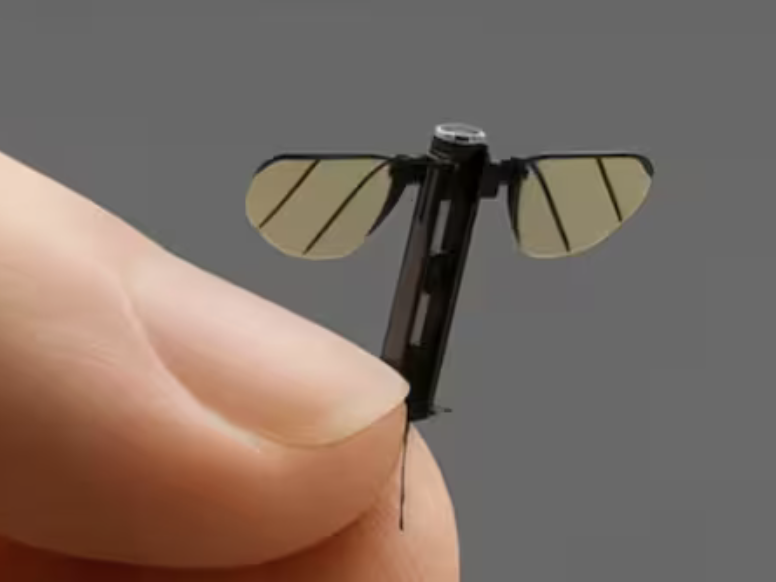
At the front of the drone is a miniature camera, allowing the operator to capture video footage while flying. It’s still in the early stages of development, but it’s already clear that the underlying technology works — and it’s only a matter of time before it’s refined. The most obvious use case, especially given the military context of its development, is battlefield reconnaissance. A drone this small could fly into spaces where larger UAVs couldn’t fit — through air vents, for instance, or into buildings thought to be sealed off — all while remaining incredibly hard to detect.
It’s not just China either. The US military has recently procured micro drones from Norway, known as the Black Hornet. Described by their manufacturer as the “next generation in covert UAV capability,” these are definitely larger than the mosquito drone, but not by much. They’re still small enough to fit in the palm of your hand or slip into a pocket, and they come loaded with high-end features like thermal imaging and ultra-low-light cameras.

So while AI drones are already part of our everyday consumer lives in a fun and accessible way, it’s becoming clear that military applications are evolving just as quickly — if not faster — and the future of surveillance is going to look very, very small.
Finally, an AI use I can truly get onboard with
I’ve long said that, for me, the whole point of artificial intelligence — and the number one way to get people genuinely excited about it — is to figure out how it can make our lives better. AI tools that write haikus or generate gimmickyphotos might be fun for a few minutes, but beyond that, most people don’t really have a use for them. This is where I’ve argued Apple might still have a long-term edge when it comes to AI, because more than any other company, I think Apple understands that AI should be a tool that makes life easier, not just a party trick.
Well, you can now add another company to that list: Ring, the makers of video doorbells and home security cameras. They’ve just announced that, starting this past Wednesday, they’re rolling out generative AI descriptions to their camera feeds for users in the US and Canada — and yes, for now it’s limited to those two countries. The feature is available to subscription holders, and it’ll work with all existing Ring doorbells and cameras. So even if I did have a Ring doorbell (which I don’t), I wouldn’t be able to try it over here in the UK just yet.
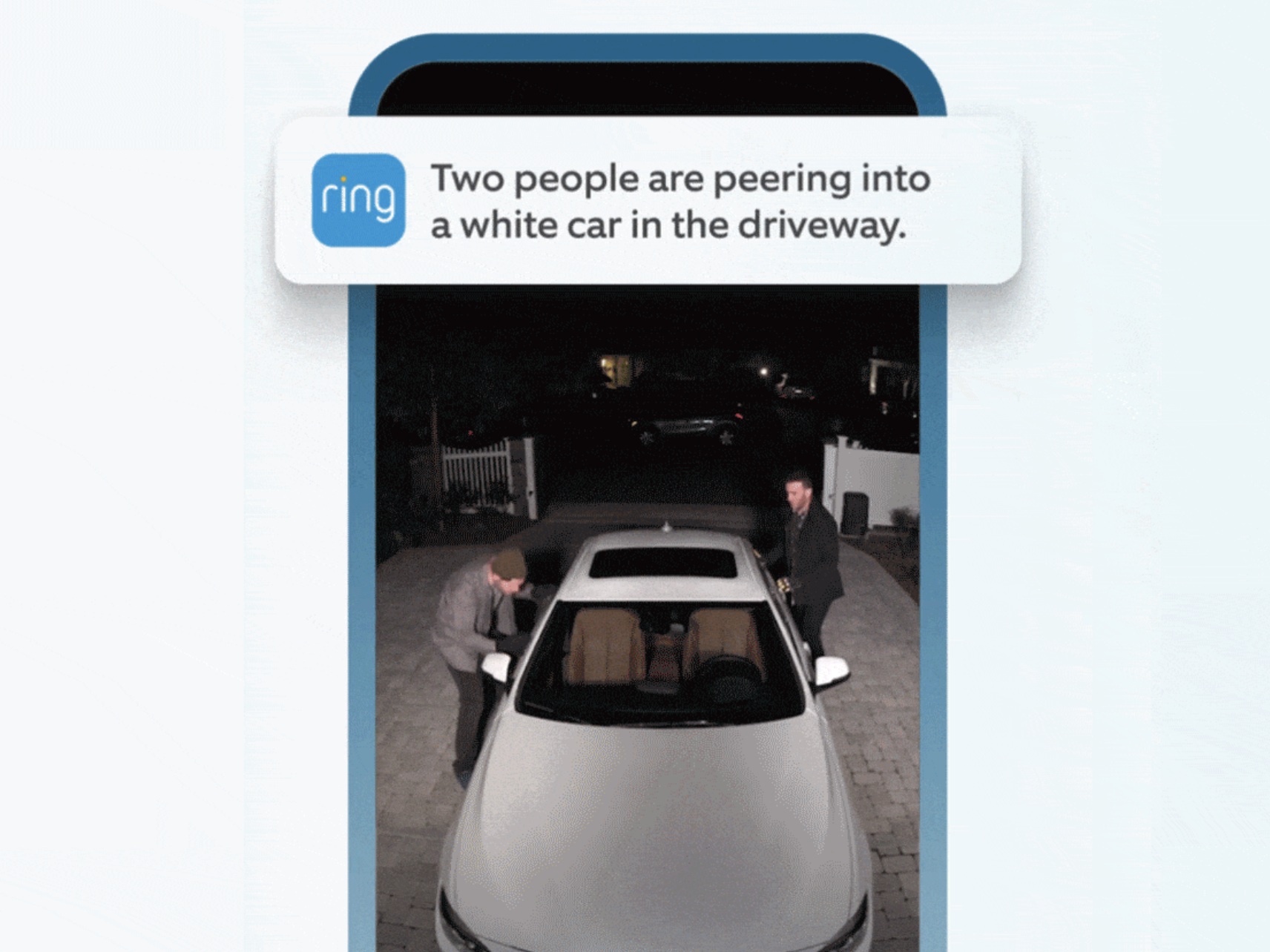
The idea behind it is simple, but genuinely useful. Right now, most cameras will tell you when motion is detected, and the smarter ones might be able to say something like “a person is at the door” or “a package has been picked up.” I use Eufy cameras here at home, and they already use a bit of onboard AI to tell me whether it’s a car or a person on the driveway — and if it’s a person, it tries to identify them based on photos of people in our household.
The problem is, that level of AI doesn’t go far enough. A notification at 3pm saying someone’s on the driveway isn’t necessarily cause for alarm. But a notification saying that two people are peering into your car windows absolutely is — and that’s exactly the kind of meaningful distinction Ring’s new AI descriptions aim to make.
In some of the promo images Ring has released, there’s a thumbnail of a golden retriever tearing up paper towels in the living room, accompanied by a caption that describes exactly what’s happening. That sort of thing is actually really useful — you don’t need to open the app and scrub through video. You get a clear description of what’s going on and can decide straight away if it’s worth dealing with.
It would also be interesting to see if this could tie into custom instructions. Imagine you’re expecting a delivery and the AI recognises the courier company and automatically plays back a pre-recorded message with delivery instructions. That kind of real-world usefulness is where I think AI has the potential to really shine.
So, if you’re a Ring user in the US or Canada and you start to get access to these new features over the next few weeks, do drop me a line and let me know what you think. I’d be really curious to hear how it performs in the real world.
OS 26 Betas offer fixes, improvements to Liquid Glass concerns
Developers have now had access to the new beta software for a couple of weeks, and as is standard for Apple, they released a second developer beta earlier this week, featuring a number of early bug fixes and tweaks based on the feedback that’s been coming in.
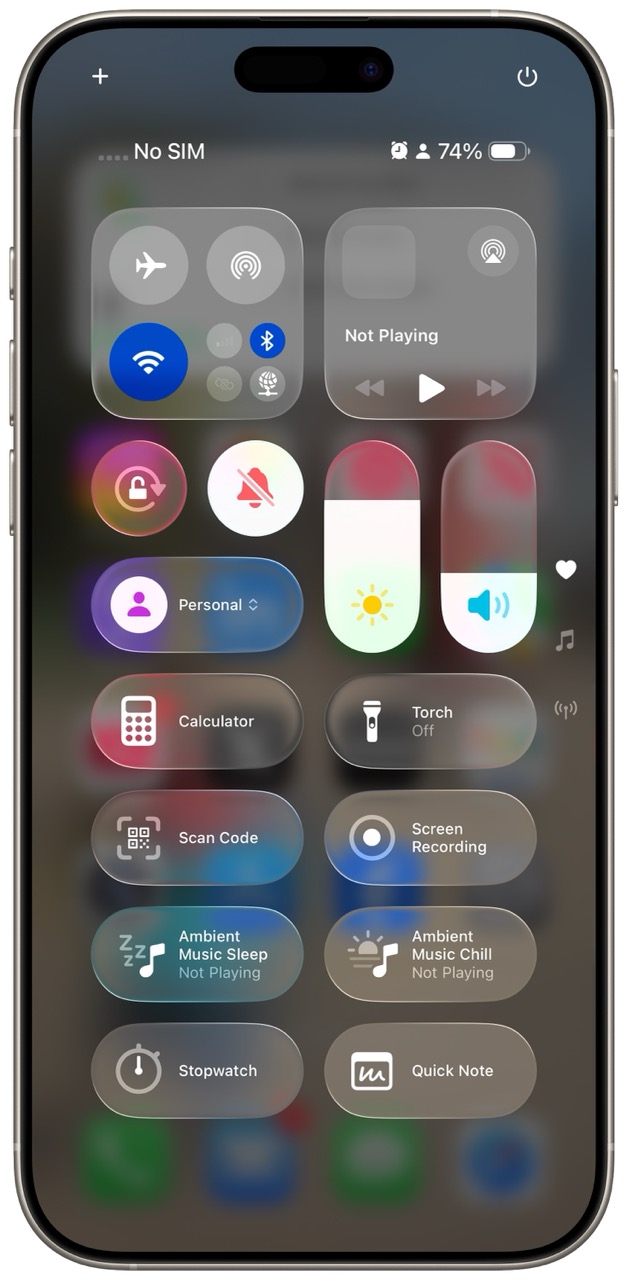
Most notably, there have been some refinements to the Liquid Glass aesthetic. While I’ve got no doubt that Liquid Glass is here to stay, it’s good to see that Apple has taken some of the early feedback on board. There were definitely areas of the OS where, as beautiful as the effect looked, it made actually using the device harder than it needed to be. I mentioned this in last week’s newsletter, where I shared a screenshot of Control Centre, and pointed out how difficult it was to see what you were doing because of the transparency. That’s now been addressed — Apple has added a stronger blur effect to the background, which makes the interface much easier to navigate.
There are a couple of other changes as well, though I suspect at least one of them is an unintentional bug. If you remove one of the four apps from the dock on your iPhone, the remaining three now sit left-aligned rather than re-centring themselves. Visually, it looks odd — and very un-Apple — so I imagine that’ll be fixed in a future beta.
Apple has also added a few accessibility improvements, such as a high contrast mode that places a border around Liquid Glass elements to help users who may find the effect hard to work with. Yes, it does compromise the aesthetic a little, but it’s a smart and inclusive option — and one that makes a lot of sense, especially with the public beta likely to drop in the next couple of weeks.
That public release will give non-developers a safer way to try out the new operating system, without the higher risk that comes with developer builds. That said, and as I mentioned last week, I’ve been genuinely impressed with the stability and performance of the betas so far.
Tip of the week
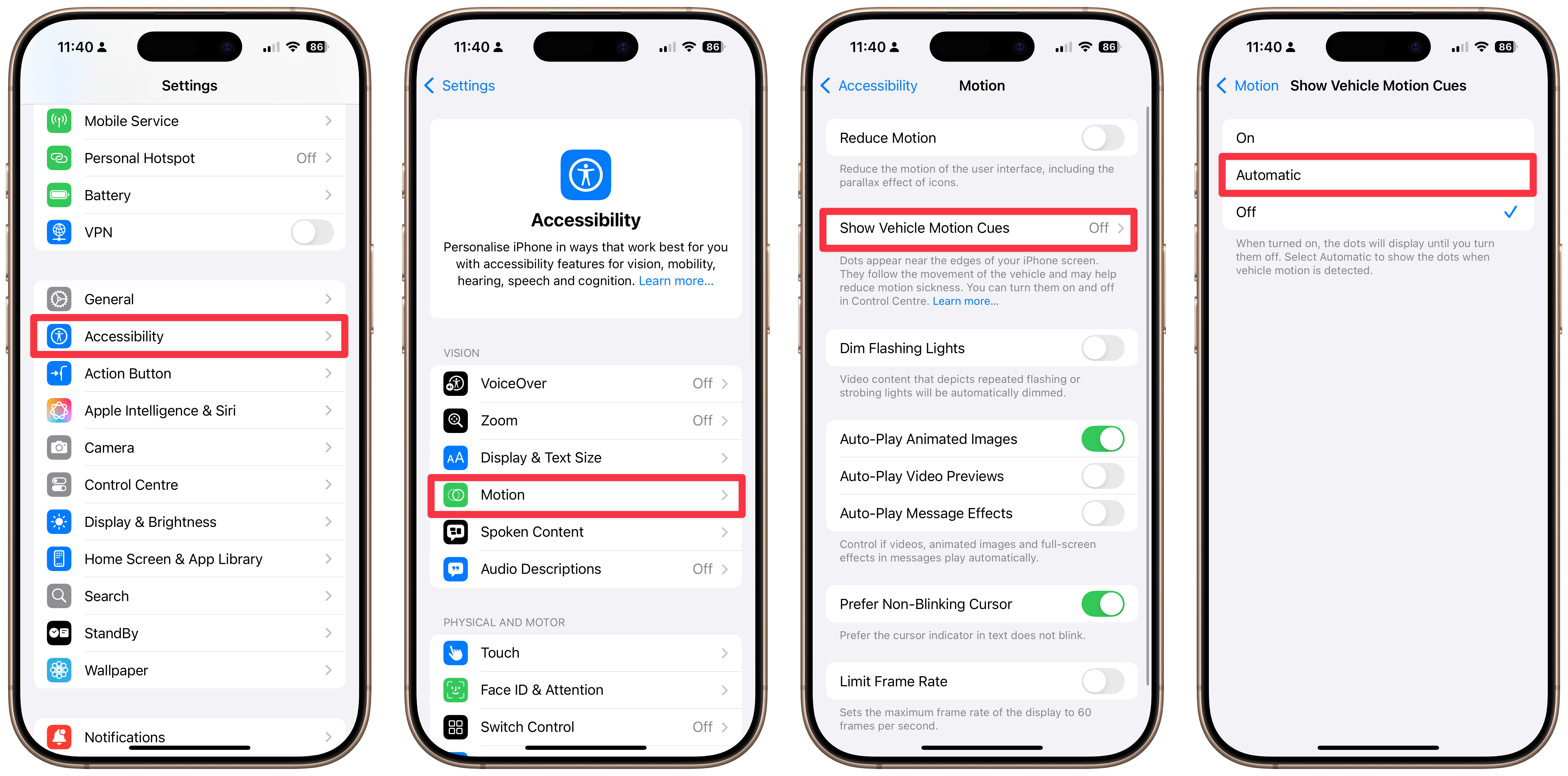
If you struggle with motion sickness while using your iPhone in the car, head into Settings, then choose Motion, then Show Vehicle Motion Cues, and set this to Automatic.