This week, Apple just can't seem to catch a break, and some Prime Deals worth a look...
Apple's top-talent heads for the exit
Things really do seem to be going from bad to worse over at Apple right now, thanks to a rare display of executive musical chairs that’s played out over the past week. The most high-profile departure is that of Chief Operating Officer Jeff Williams, who announced his retirement after more than 25 years at the company. Williams has long been described as Tim Cook’s right-hand man and was widely considered a potential successor to the CEO throne. Although interestingly, Mark Gurman, Bloomberg analyst and often a reliable Apple insider, has said for some time that he sees hardware chief John Ternus as the more likely candidate when Cook eventually steps down.

Still, Williams’ departure will make a mark. His replacement, Sabi Khan, is a long-time Apple veteran with deep expertise in supply chain and operations, exactly the kind of steady hand you’d expect from Cupertino. Williams played a central role in Apple’s biggest product launches, from the Apple Watch to the company’s health initiatives, and his exit comes at a time when Apple is facing more questions about its direction than it has in years.
But it’s not just the C-suite where the shake-up is happening. Apple’s AI division, the team responsible for keeping Siri and other services competitive in the era of ChatGPT and Gemini, has lost some critical talent to their biggest rivals. The most notable recent exit is Raoming Pang, a senior AI leader who’s now joined Meta’s superintelligence team. Pang was central to Apple’s push to develop its own foundation models, the core technology behind next-gen assistants and on-device intelligence. His move is a huge win for Meta, and yet another sign that the AI talent wars are heating up fast across Silicon Valley.
For Apple, a company that has always prided itself on building its core tech in-house and keeping its plans tightly guarded, these departures are more than just a talent drain. They raise real questions about whether the company’s AI ambitions are still keeping pace with the competition. And they certainly add fuel to the fire of recent rumours that Apple may be exploring partnerships with OpenAI or Perplexity to outsource some of its AI functionality.
Unfortunately, the bad news doesn’t stop there. There’s another story playing out right now: layoffs and restructuring. Apple has confirmed that around 600 employees are being let go, following earlier cuts tied to the winding down of its long-rumoured Apple Car project. That number may be small compared to the mass layoffs we’ve seen at Google, Meta, and Amazon; but it’s still notable for a company that’s famously avoided job cuts, even in tough times.
Most of the affected roles are in areas that Apple appears to be quietly pulling back from, automotive, certain types of AI research, and even parts of its customer support teams, where automation is starting to take over. It’s a big moment, and it raises real questions about where Apple’s focus lies, and what parts of the business they see as essential going forward.
And with all of this happening under Tim Cook’s leadership, it’s hard not to wonder whether the man best known for logistics and supply chain mastery might finally be finding himself a little out of his depth. While Cook has made it clear that he’s not planning to step down anytime soon, it’s fair to ask whether a shake-up at the very top might be just what the company needs. The tech landscape in 2025 is very different from the one Cook inherited when Steve Jobs passed the torch, and staying competitive may now require something more than just operational excellence.
Enjoy tips videos, but struggle to remember everything?
Then you should definitely take a look at iPhone Essentials Plus. It’s my dedicated iPhone training portal with more than 150 lessons covering every aspect of your device, and I’m adding new content all the time.

Each lesson includes a short video, a step-by-step guide with screenshots, and a downloadable PDF, so no matter how you like to learn, you’re sorted. There are no ads, no sponsors, just straight-up content, and it’s all available for a one-time payment, no subscription.
And if you’re a Mac user, I’ve just launched a Mac version too. You can pick that up on its own or bundle it with the iPhone course to get the best value. If you’re interested, click the links below to get started.
Purchase Links;
- iPhone Essentials Plus
- Mac Essentials Plus
- iPhone & Mac Essentials Plus Discount Bundle
- iPhone & Lifetime PDF
- Mac & Lifetime PDF
- iPhone, Mac & Lifetime PDF
Prime Day Deals worth a look...
In what’s otherwise been a pretty slow news week, I figured it might be a good time to share some of the best Prime Day deals I’ve been able to find.
A quick reminder when it comes to Prime Day. I’m based in the UK, even though more than half of you are reading this from the US. So while I’ll include US deals here, it’s a little trickier for me to verify them all firsthand. I’ve done my best to cross-check each one, but apologies in advance if any of them turn out to be inaccurate. That's also why I've not included links - just head to Amazon and search, to see the best deals available to you.
Also, the same piece of advice I give every year still stands: only buy something if it’s something you actually need or were already planning to buy, just now at a better price. That said, if you’re in the market for some new Apple gear and don’t mind picking something up now knowing that new versions are likely coming later this year or early next, there are some genuinely great savings to be had.
On the Apple Watch front, Amazon is listing the 2nd-gen Apple Watch SE for $169, and the excellent Apple Watch Series 9 (you mentioned Series 10 but I assume you meant 9) for $279. You can also get an all-black Apple Watch Ultra 2, GPS and Cellular, for $650, which is the lowest price I’ve personally seen. Yes, we’re expecting the Ultra 3 this September, but unless you really need the rumoured satellite connectivity, the Ultra 2 is still a powerhouse, especially at this kind of discount.
Over in the AirPods department, you can currently get the standard AirPods (4th gen) for $89, and the AirPods Pro 2 for just $149. I own both; the AirPods 4 are very solid if you’re on a budget, but if you can stretch to the Pros, I’d go that route every time. They’re genuinely fantastic value at that price. AirPods Max are also discounted to $430, which still feels a bit high for me. I do like mine - the sound quality is brilliant - but the quirks like the weird case and the lack of a proper power-off option are still frustrating.
On a side note, not related to Apple, Sony’s XM5 headphones are also on sale at a really great price. They’ve just been succeeded by the XM6, which are being called some of the best noise-cancelling headphones money can buy. But if you want great audio without the premium price tag, the XM5s are still very, very good.
Over on the iPad side, the base model iPad is available for $279, or you can pick up the 11-inch iPad Air for $479, and the 13-inch model for $679. The latest iPad mini (the one that will support Apple Intelligence) is showing at $379. Honestly, if it were me, I’d spend the extra $100 for the 11-inch Air, but if you really love the smaller form factor, the Mini is also a great buy.
And finally, let’s talk MacBooks. You can get the 2025 MacBook Air with the M4 chip for $849, which is a brilliant deal. If you want something more powerful, the 2024 MacBook Pro (also with M4) is available for $1,429, but unless you really need the extra performance, the Air is hard to beat at that price. There’s also a 2024 iMac, again with M4, listed at $1,149.
If you spot any other particularly great deals I haven’t mentioned here, feel free to hit reply and let me know. I’m always happy to pass good tips along to others.
Tip of the week
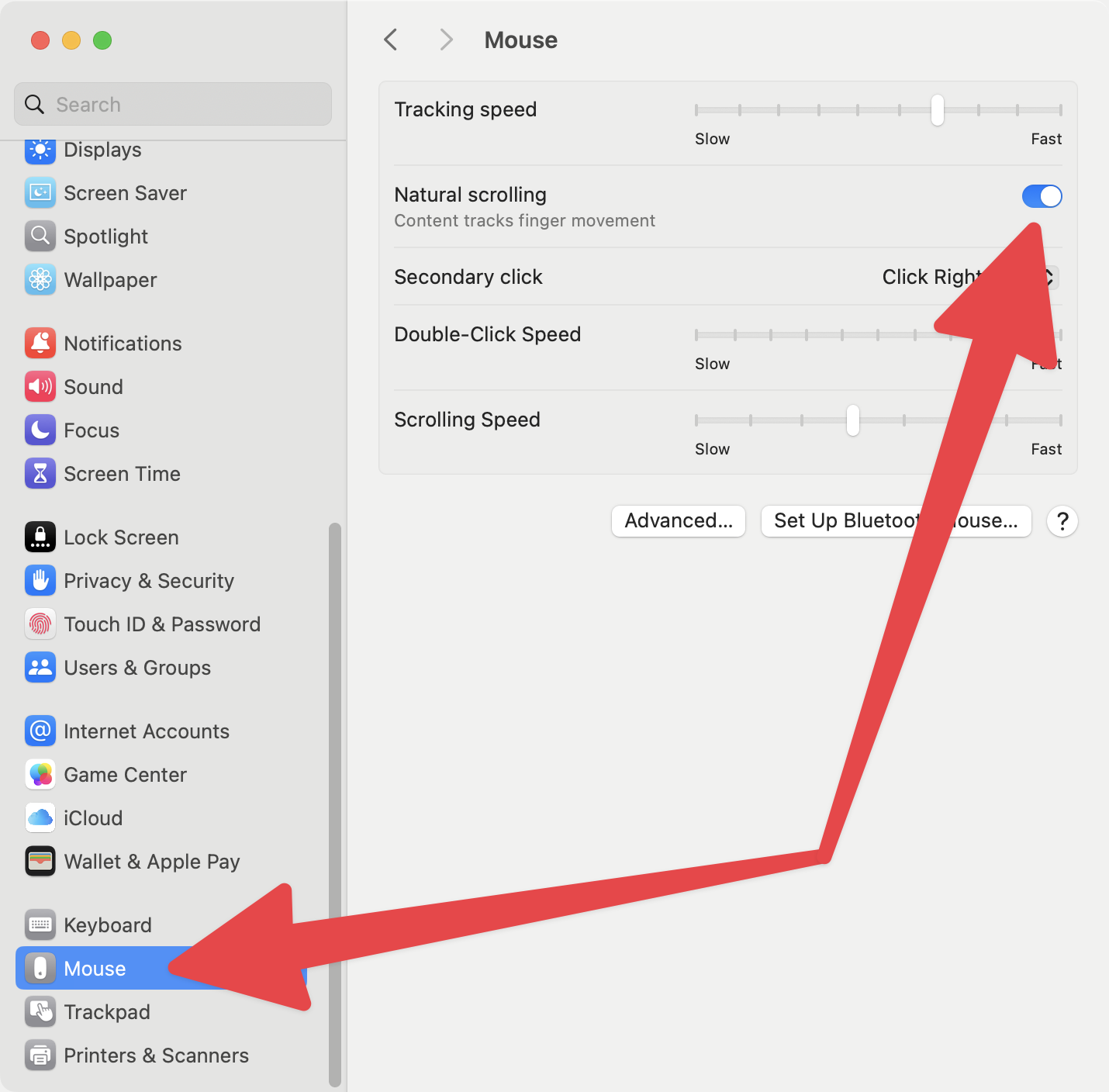
If you own a Mac, and you struggle with the scroll direction of your mouse or trackpad, you can easily change it. Just head into System Settings, then choose either Mouse or Trackpad (depending on your system), and either enable or disable Natural Scrolling, as needed.
My new content
10 Mac tips most owners don't know
|
10 AMAZING things your iPhone can do
|